

Every merchant has their own operating rules. For logistics providers managing multiple Shopify stores, these options adapt order imports, picking instructions and data exchanges with the WMS.
These settings are configured separately for each store.
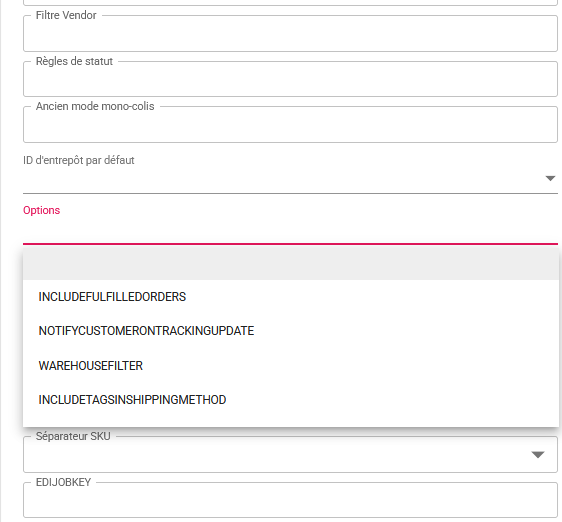
Order imports
INCLUDEFULFILLEDORDERS
Includes orders that have already been prepared or shipped in order imports.
WAREHOUSEFILTER
Includes only order lines assigned to the default warehouse.
Picking and packing instructions
FULFILLABLEQUANTITY
Uses the quantities remaining to be fulfilled.
ORDEREDQUANTITY
Uses the quantities originally ordered. These two options represent alternative operating modes.
DISPLAYORDERSCOUNT
Displays the number of previous orders placed by the customer in the notes for the warehouse operator.
DISPLAYCUSTOMERTAGS
Adds customer tags to the notes for the warehouse operator.
SIZEMANAGEMENT
Enables size management, with a slight increase in processing time.
LEGACYMONOPARCEL
Maintains the legacy workflow used by some longstanding customers: each order is prepared in full and shipped as a single parcel.
Carriers and tracking
INCLUDETAGSINSHIPPINGMETHOD
Uses keywords in tags to select the carrier.
NOTIFYCUSTOMERONTRACKINGUPDATE
Instructs Shopify to notify the customer when their parcel tracking information is updated.
Data and WMS integration
APIDONOTREPLACEADDRESS
Keeps the locally stored address instead of replacing it with the address received through the API.
ENRICHORDERSFROMCATALOG
Enriches orders with product catalogue information, particularly for customs declarations. This option slightly increases processing time.
HIDESKUFROMWMS
Hides the SKU and sends only the EAN code to the WMS to identify the product.
Fulfillment before payment, particularly for B2B
ALLOWFULFILLMENTBEFOREPAYMENT
Allows orders with pending payment to be prepared and shipped, particularly for merchants offering payment terms. Disabled by default, this option applies to the entire store concerned.
Partner configurations
STOREANDSUPPLY and BIGBLUERELAY
Enable the specific workflows required for integrations with these partners.
Need to adjust a store’s settings?
On the store page, click the “Contact support” button at the top of the page. Describe the merchant’s operating rules and the options you need.
An email will be sent to support. If your email address is entered in your user profile, you will also receive a copy.