
This procedure explains how to create an integration in Adobe Commerce or Magento Open Source 2 and enter its four OAuth credentials in AtomicSeller.
Before you begin #
- You have a Magento administrator account that can create and activate integrations.
- The store and its REST API are reachable from the Internet through a valid HTTPS address.
- You know the store root address without an administration path.
- You have permission to manage stores in AtomicSeller.
Create the integration in Magento 2 #
- In the Magento Admin, open System > Extensions > Integrations.
- Select Add New Integration.
- Enter a clear name such as AtomicSeller, a technical email address, and your administrator password when Magento requests it.
- In the API panel, grant the resources needed for orders, products, inventory, shipments, and store information. The resource tree varies by version and extensions; ask AtomicSeller support for the exact matrix when applying least privilege.
- Save the integration, then select Activate and Allow.
- Immediately copy the four displayed values: Consumer Key, Consumer Secret, Access Token, and Access Token Secret. Store them in a password manager.
Configure the store in AtomicSeller #
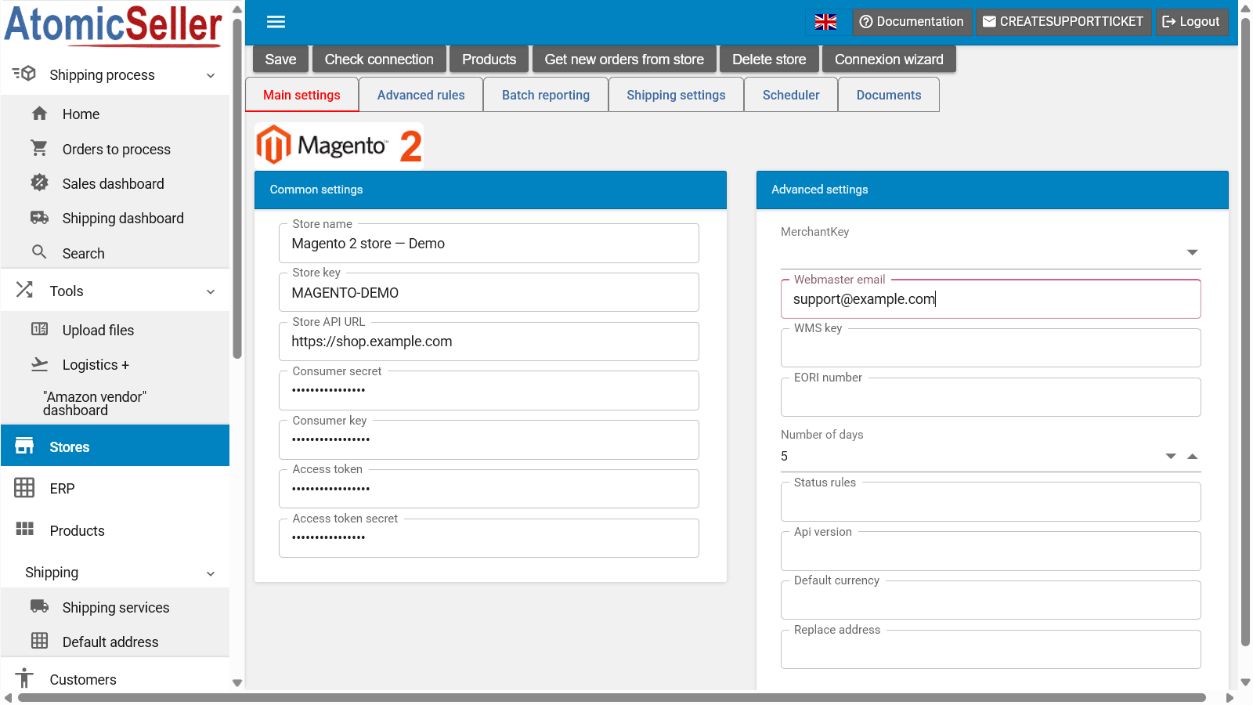
- In AtomicSeller, open Stores, select Add a store, then select Magento V2.
- Under Main settings, enter a Store name and a short unique Store key.
- In Store API URL, enter the Magento HTTPS root address, for example
https://shop.example.com. - Enter the four Magento values in Consumer secret, Consumer key, Access token, and Access token secret.
- Enter a technical address in Webmaster email if your organization uses this field.
- Set the Number of days to retrieve during the initial synchronization.
- Select Save, then Check connection.
- When the test succeeds, retrieve orders and review them under Orders to process.
Expected result. AtomicSeller confirms OAuth authentication with Magento 2 and retrieves orders covered by the granted resources.
Troubleshooting #
401 error. Confirm that all four values belong to the same active integration, no whitespace was added, and no value was regenerated after you copied it.
403 error. The integration is recognized but lacks required API resources. Update the permissions, reauthorize the integration, and copy the new tokens if Magento regenerates them.
404 error or timeout. Check the root URL, HTTPS certificate, firewall, and public accessibility of the REST API.
No orders appear. Check the number of days, configured statuses, and access to the Sales resources.
Official references #
- Create and activate an Adobe Commerce or Magento Open Source integration
- Token-based authentication and OAuth credentials