This section allows you to customize how the platform looks and behaves according to your workflow. You can update your editor mode and choose what information appears on your home page.
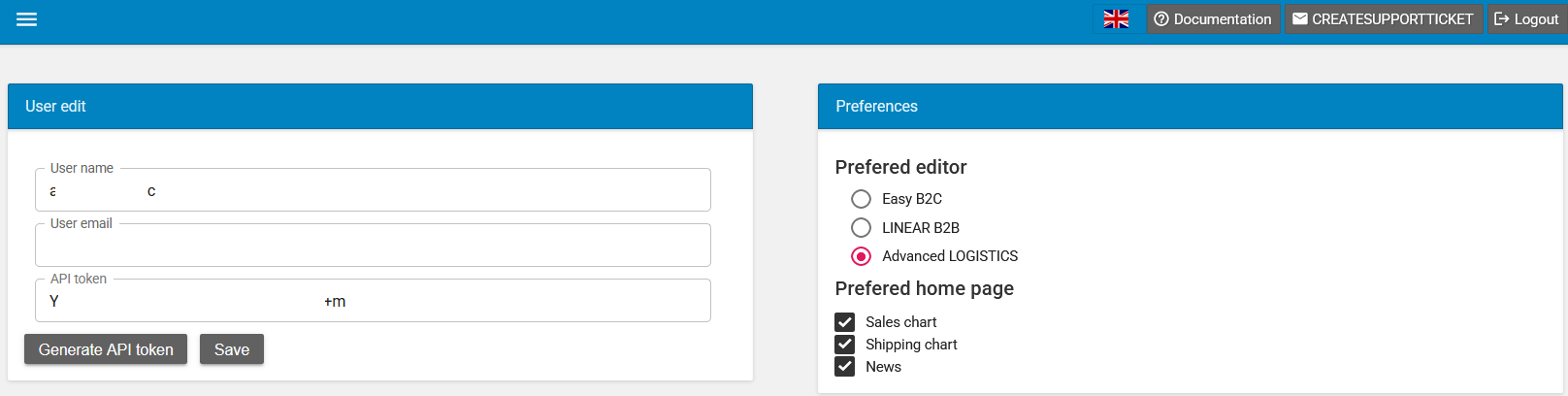
🔧 Preferred Editor #
Select the interface that best matches your business needs:
- Easy B2C
A simplified interface designed for business-to-consumer operations. - LINEAR B2B
Ideal for structured, business-to-business processes with linear workflows. - Advanced LOGISTICS (currently selected)
A more powerful interface tailored for complex logistics and operational management.
👉 Tip: Choose Advanced LOGISTICS if you manage shipments, inventory, or multi-step operations.
🏠 Preferred Home Page #
Control what widgets appear when you log in:
- ✅ Sales Chart – View your sales performance at a glance
- ✅ Shipping Chart – Track shipping activity and trends
- ✅ News – Stay updated with the latest platform or industry news
👉 Tip: Enable only the widgets you use regularly to keep your dashboard clean and fast.
💾 Saving Your Preferences #
Once you’ve made your selections:
- Review your choices
- Click Save to apply your changes
Your preferences will be updated immediately and reflected the next time you access your dashboard.
✔️ Best Practices #
- Choose an editor that matches your daily tasks to improve efficiency
- Keep your homepage minimal to focus on key metrics
- Revisit preferences anytime as your needs evolve
If you need further assistance, use the Documentation or Create Support Ticket options available in the top menu.