
Configure your DHL Express account in AtomicSeller: connection details, label settings and default sender.
1. Open the shipping service #
Open Shipping > Shipping services, then double-click the DHL Express service you want to configure. Have the account details supplied for your contract ready.
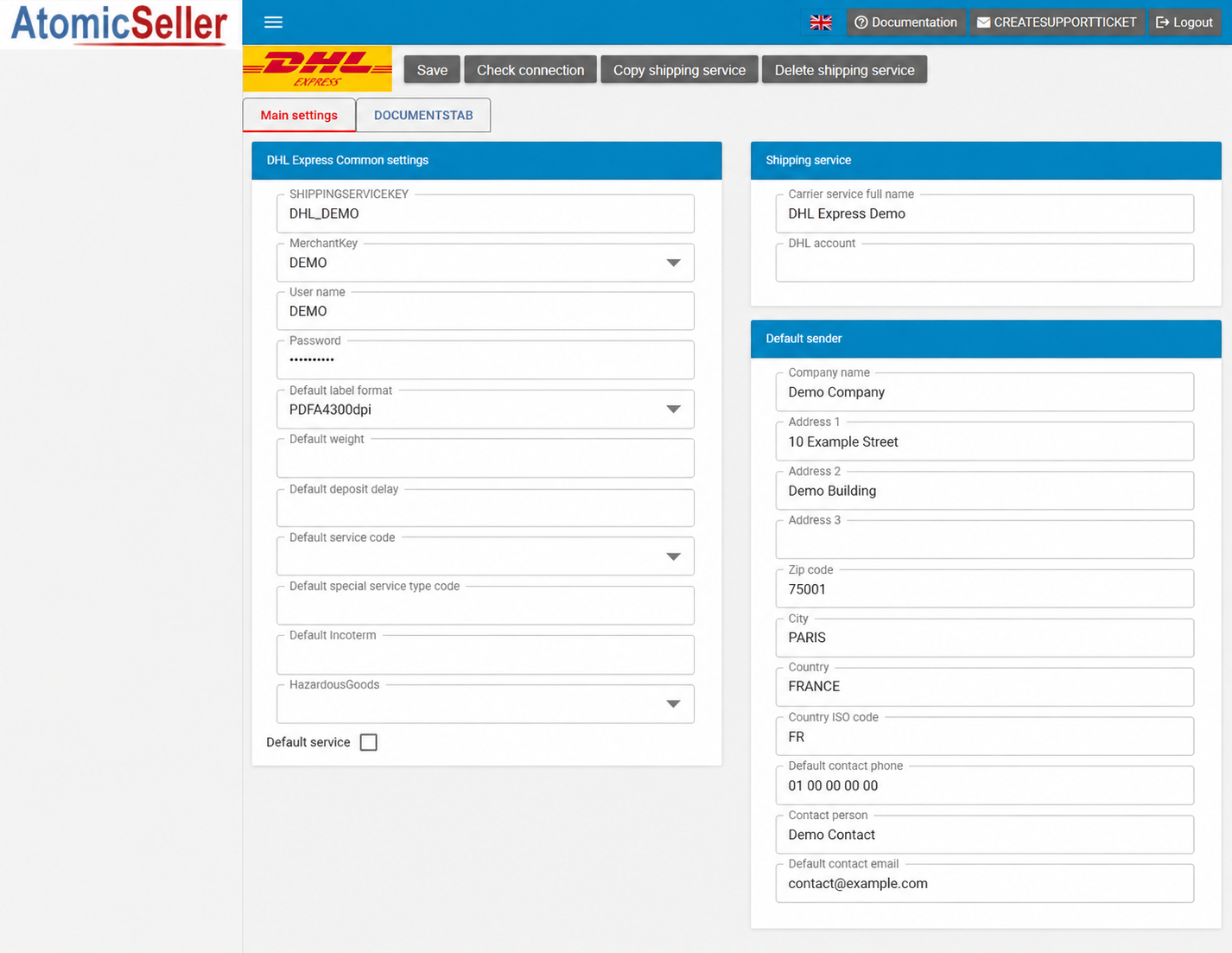
2. Identify the service #
| Field | What to enter |
|---|---|
| SHIPPINGSERVICEKEY | The code identifying this service in AtomicSeller, for example DHLEXPRESS_DEMO. Keep an existing service code until its use in your integrations has been checked. |
| MerchantKey | Select the relevant merchant in your account. This list depends on your merchants; Demo names in the illustration are examples. |
| Carrier service full name | A name that helps you recognise the service, for example DHL Express Demo. |
3. Enter the account details #
| Field | What to enter |
|---|---|
| User name / Password | Your DHL Express connection username and password. |
| DHL account | Your DHL account number. This field is in the right-hand column, below the service name. |
4. Choose the label and service settings #
| Field | What to enter |
|---|---|
| Default label format | Select a format compatible with your printer and carrier connection. The displayed choices are listed below. |
| Default service code | Select the service appropriate for your shipments and contract. A service appearing in the list is not necessarily enabled on your account. |
| Default weight | Default weight. Confirm the unit and when your configuration uses this value before entering it. |
| Default deposit delay | Default parcel handover delay. Use the value specified for your workflow; confirm the unit and calculation if needed. |
| Default service | Select this checkbox if the service should be designated as the default in your configuration. |
Label formats #
PDF10x15300DPI identifies a 10 × 15 cm PDF at 300 dpi, intended for dedicated self-adhesive label printers. PDFA4300dpi is the A4 PDF option. Other displayed formats (ZPL and DPL) are intended for compatible professional printing workflows. Confirm the format supported by your carrier connection before changing an existing setting.
Additional settings #
| Field | What to enter |
|---|---|
| Default special service type code | Default special service code. Enter only a value confirmed for your DHL contract. |
| Default Incoterm | The default Incoterm specified for your shipments. Use the value agreed for your workflow; this field alone does not define your commercial terms. |
| HazardousGoods | The list contains a blank value and codes HD/PI966, HV/PI967, HM/PI969 and HW/PI970. Select only the option confirmed with DHL for the goods concerned. An option appearing in the menu does not constitute authorisation to ship. |
Document templates #
The DOCUMENTSTAB tab contains a list with Document model path, Paper format, Document rule and Document type, and an Add button. Have the required templates and rules confirmed before adding a document configuration.
Available dropdown choices #
The following labels are reproduced exactly as displayed in the application, including French product names. A blank entry is shown as “(blank)”; its effect depends on the field.
Default label format #
- PDFA4300dpi
- PDF10x15300DPI
- ZPL10x15203dpi
- ZPL10x15300dpi
- ZPL10x10203dpi
- ZPL10x10300dpi
- DPL10x15300dpi
- DPL10x15203dpi
- DPL10x10203dpi
- DPL10x10300dpi
Default service code #
- (blank)
- Express 12.00 (Y – TDY) (Y)
- Express Wordwilde (P – WPX) (P)
- Express Wordwilde (EU) (U – ECX) (U)
- Domestic Express (N – DOM) (N)
- Economy select (H – ESI) (H)
- Economy select (EU) (W – ESU) (W)
HazardousGoods #
- (blank)
- HD PI966 LITHIUM ION BATTERIES IN COMPLIANCE WITH SECTION II OF PI966
- HV PI967 LITHIUM ION BATTERIES IN COMPLIANCE WITH SECTION II OF PI967
- HM PI969 LITHIUM METAL BATTERIES IN COMPLIANCE WITH SECTION II OF PI969
- HW PI970 LITHIUM METAL BATTERIES IN COMPLIANCE WITH SECTION II OF PI970
5. Complete the default sender #
Enter the default sender under Default sender. These details are intended for use when no sender is provided in the order or through the API.
| Field | What to enter |
|---|---|
| Company name | Sender company name. |
| Address 1 | Street number and name. |
| Address 2 / Address 3 | Additional address details, if needed. |
| Default contact phone | Sender contact phone number. |
| Contact person | Sender contact name. |
| Default contact email | Sender contact email address. |
| Zip code / City | Postal code and city. |
| Country / Country ISO code | Country and two-letter code, for example FRANCE and FR. |
6. Save and check the connection #
Use Save to save the settings and Check connection to run the available connection check. If an error appears, review the account credentials and selected service, then contact AtomicSeller support with the exact error message if needed. Do not include passwords or secret keys.